Custom Style Sheets (CSS)
The Custom CSS feature in Team Forms lets you take complete control over how your form looks and feels. It uses standard CSS (Cascading Style Sheets) — the same technology used to style websites — so anything you already know about CSS will work here.
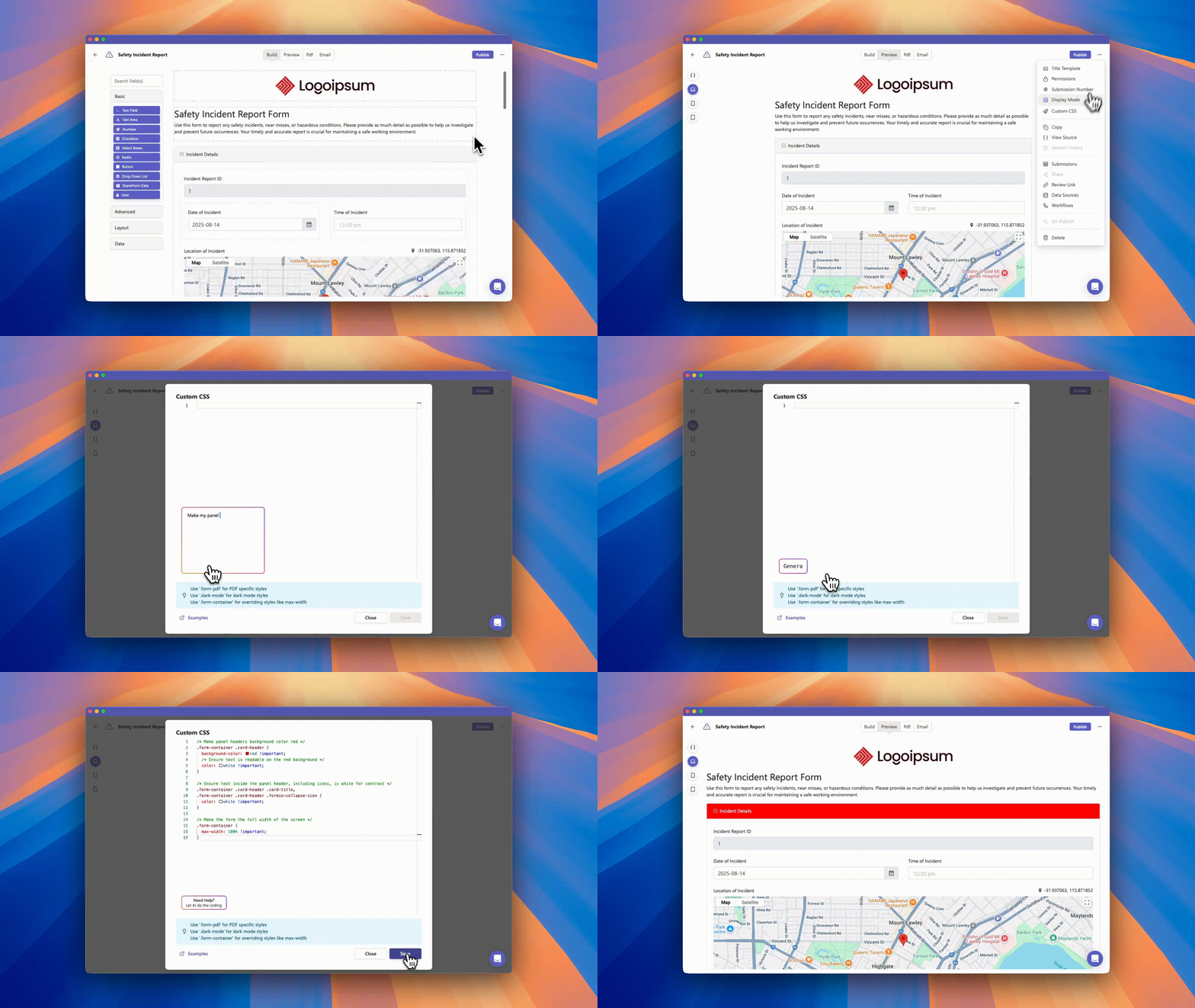
If you’re not familiar with coding, open the form in the builder and ask the Team Forms AI assistant to style it. The assistant can inspect the current browser and PDF markup before updating the custom CSS.
What You Can Do
Section titled “What You Can Do”With Custom CSS, you can:
-
Match your form’s design to your brand by changing fonts, colors, and spacing.
-
Add backgrounds, gradients, and other design elements.
-
Restyle buttons, labels, and navigation.
-
Customise how your generated PDFs look.
See examples of common CSS customisations →
How to Access Custom CSS
Section titled “How to Access Custom CSS”-
Open your form in the Form Builder.
-
Click the … (more options) icon in the top-right corner.
-
Select Custom CSS.
-
Enter your own CSS and select Save. To use AI instead, close the dialog, open Ask AI, and describe what you want to change.